This article discusses the LEGO brand and the struggle for it to stay on top. Giving designers creative freedom seems to have backfired rather than helping the company grow. Read on to find out more.
Article Here.

July 28, 2010
July 12, 2010
Knife Tool In Illustrator
The Knife tool in Illustrator can be used to cut a shape into smaller segments. The tool can be used to cut straight lines, or make more freehand cuts.
The Knife tool is located in a different place depending on which version of Illustrator you have. Below, I have shown where the knife tool is located in CS2, CS3, CS4, & CS5.
CS2 CS3 CS4 CS5


 +
+ 




 +
+ 


 +
+  +
+ 


CS2 CS3 CS4 CS5


I) Make a freehand cut
II) Make a straight line cut
III) Make a straight line cut on 90º angles
For all of these steps we're going to need to create a shape. In this example, I'm using a green box with a pink stroke.
I'm going to select the box, and then select my knife tool.
+ I) Making a freehand Cut
Click and drag your knife tool over your shape.
Notice that you will now have two segments. In my example this is evident by the pink outline, around my newly created 2 shapes. You can now use your selection tool(the normal arrow) and move the pieces around.
II) Make a straight line cut
Hold down the Option keyand click and drag your knife tool over the shape. Notice that the line you are drawing is straight. No matter how wobbly your hand is, your line will be straightened. If you are a Windows user, press the Alt key instead of Option.
+ III) Make a straight line cut on 90º angles
Hold down Option + Shift and click and drag your knife tool over the shape.
If your line is close to vertical, then it will snap to a perfectly vertical line. If it is close to 45º then it will snap to that angle. In my example the line I drew was closeto vertical, and I ended up with a perfectly vertical line! If you are a Windows user, press the Alt key instead of Option.
+ + Note:
Above, I stated that you must first select your shape. You do not have yourobjects selected for the knife tool to work. Simply dragging the knife tool over an object, selected or not, it will break that object into segments.
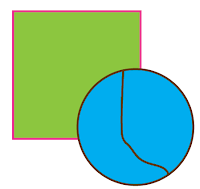
If you have 2 objects overlapping, or close to each other, the knife tool behaves differently.
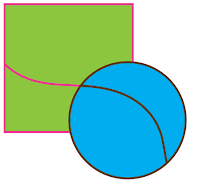
With both objects selected, and you use the knife tool, they will both be cut as seen below.
In this example, I selected only the blue circle. When I drag the knife tool over the shapes, only the blue circle is affected.
June 16, 2010
If Dr. Seuss were a graffiti artist
Sofia Maldonado is a Cuban born mural painter with a whimsical and capricious style to her murals and figures. They are reminiscent of Dr. Seuss, yet Sofia makes them all her own with with distinct urban attitudes and attire.

June 15, 2010
Sketches
I was flipping through an old sketchbook and I found some drawings that looked interesting.
This is a sage plant that I had at my old apartment. Very aromatic, and tasty with pork.

This is a fern that I had. The fern died soon after I drew this, and the plant with small leaves took over the pot. I don't know what kind it is, nor how it seeded itself indoors.
.

This is a sage plant that I had at my old apartment. Very aromatic, and tasty with pork.

This is a fern that I had. The fern died soon after I drew this, and the plant with small leaves took over the pot. I don't know what kind it is, nor how it seeded itself indoors.
.

June 14, 2010
Sanna Annukka
I just found a new artist. She puts a twist on Finnish folk and gives it a contemporary appeal. If you enjoy her as much as I do, pick up one of her screen prints, or one of these little soul birds.

Subscribe to:
Posts (Atom)